The buttons at the bottom of the Shisen-Sho app (Android) include “Hint.” When you cannot find a matching picture, tap it, and it highlights one pair you can remove right now.
What Hint Does
- It highlights one pair you can remove right now.
- You can use it as many times as you like. There is no limit, and there is no penalty such as losing coins.
- When no pairs are left to remove, the app says “No more matches,” and you can choose Shuffle.
Tap the two highlighted tiles, and they are removed.
Which Pair Does Hint Pick?
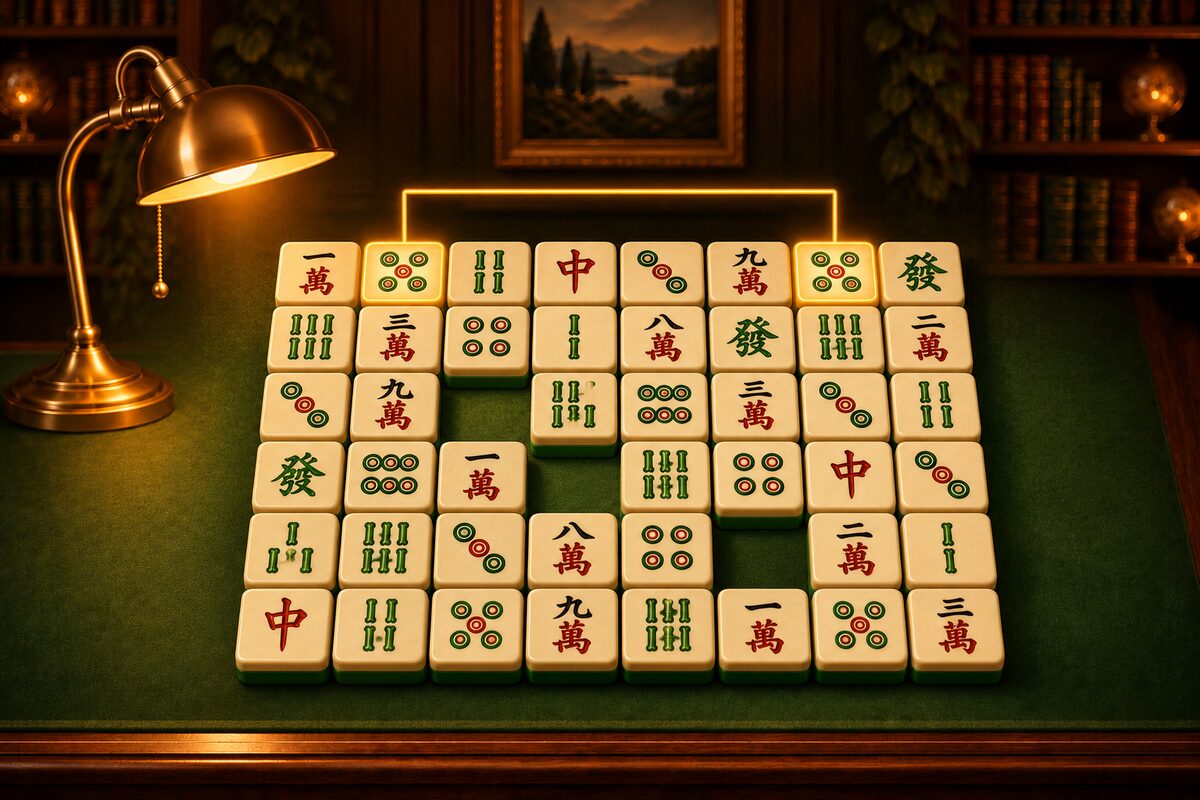
Hint looks at the tiles starting from the top row of the board and highlights the first removable pair it finds. It does not pick the best pair.
In the diagram below, for example, there are three pairs you can remove. Hint highlights the first one it finds when scanning from the top: the adjacent pair in the top row.
On this board, you can still clear everything after removing the hint’s pair, but that is not always the case. For how to think about the order of removal, see Shisen-Sho Tips.
How to Use It Well
- As a clue when you are stuck looking: Use it when you scan the board and cannot find a matching picture. If you remember the picture on the highlighted tiles, it gets easier to find next time.
- To check your eye: While you are still unsure about telling similar tiles apart (such as the 7 of Circles and the 8 of Circles), it is a good idea to play with hints to check.
- Think before you remove: Instead of removing the hint’s pair right away, look at where the other two tiles with the same picture are before you remove it. This makes you less likely to get stuck.
For the other buttons, see How to Play Shisen-Sho and How to Use the Shisen-Sho App.