This article walks you through the screens and buttons of the Pyramid app. The rules of the game are explained in Pyramid Rules and How to Play.
Reading the Screen
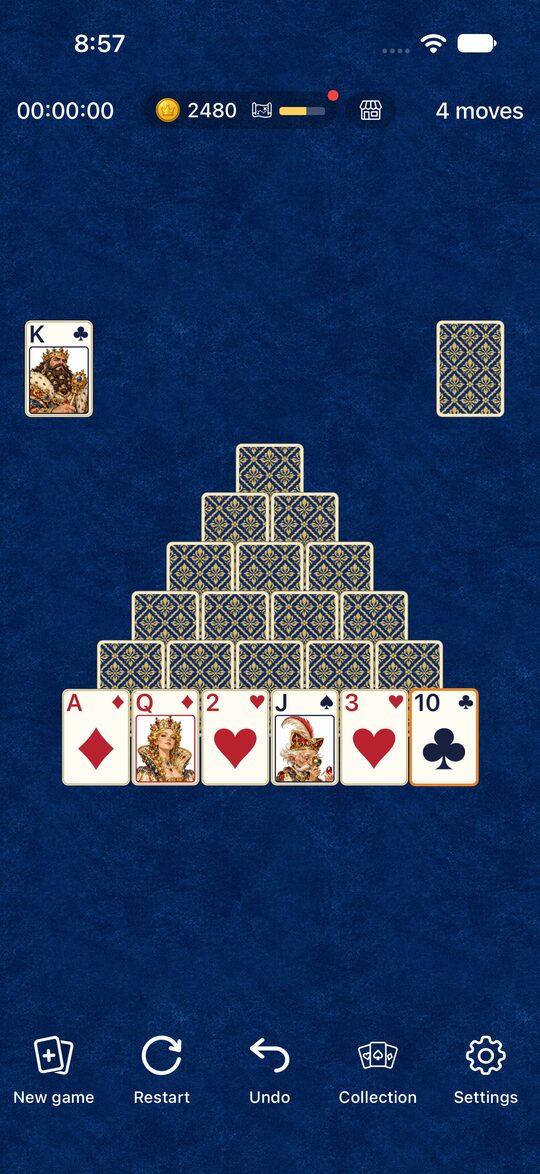
- Center: The seven-row pyramid. You can only use cards that are face up.
- Above the pyramid: The stock is on the right, and the pile of turned-over cards (the waste pile) is on the left.
- Top left: Your elapsed time.
- Top right: Your move count.
- Top center: Your coins, the exploration card, and the shop icon. Tap it to open the Collection.
Removing Cards
- Tap two cards in a row: Tap two cards that add up to 13, one after the other, and they are removed. The card you picked is outlined in orange.
- Drag: You can also drag a card onto its partner to remove them.
- Kings: A K can be removed all by itself.
- Changing your mind: Tap the selected card again to deselect it. This doesn’t add to your move count.
The Stock
Tap the stock to turn over one card. You can only use the top card of the waste pile. When the stock runs out, tap it again and the turned-over cards go back to the stock in the same order. You can do this as many times as you like (How to Use the Stock).
The Buttons at the Bottom
| Button | What it does |
|---|---|
| New game | Deals a different layout |
| Restart | Starts the same deal over |
| Undo | Goes back one move |
| Collection | Dress-up, exploration, and the shop |
| Settings | Sound, language, and how to play |
- If you tap “New game” or “Restart” in the middle of a game, a confirmation screen appears. It doesn’t appear if you haven’t made a move yet, or after you’ve cleared the game.
- You can use “Undo” as many times as you like, but it counts as one move. The time doesn’t go back. You can’t use it after clearing the game.
Time and Moves
The timer starts the first time you move a card. It pauses while the Settings screen or a confirmation screen is open. Taking a pair, turning over a card, recycling the stock, and using Undo each count as one move (Clearing the Game Fast and in Few Moves).
When You Clear the Game
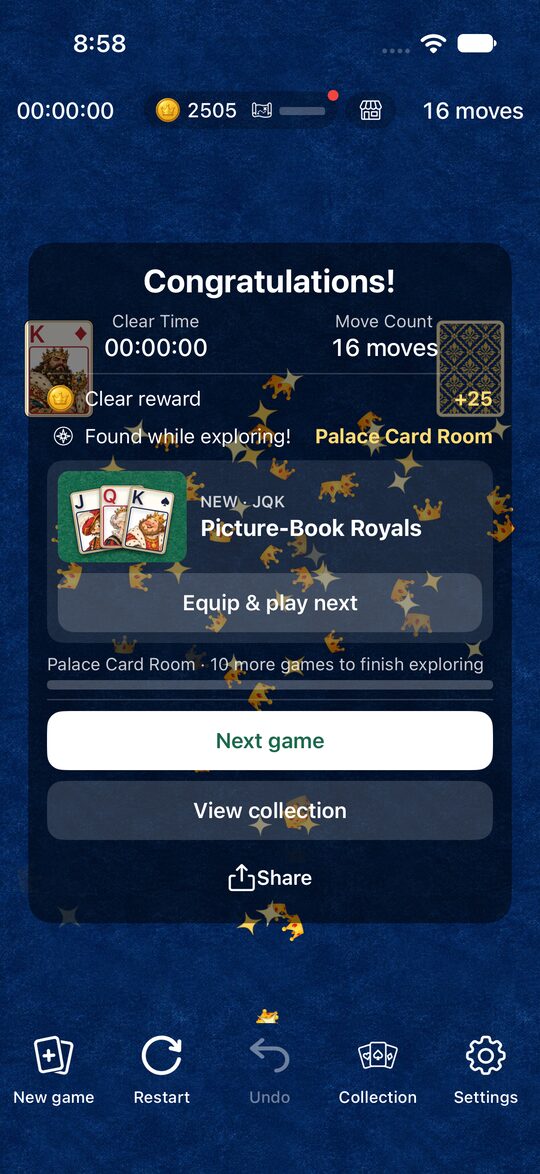
You clear the game when you remove all 28 cards. The screen shows your time and number of moves, and the clear effect you have equipped plays (fireworks at first). You can also see the coins you earned and any items you found while exploring on this screen (Dress-Up and Exploration).
Settings
In Settings, you can do the following.
- Sound: Turn sound effects on or off.
- Language: Choose from 10 languages, including Japanese and English. At first the app matches your device’s language.
- How to play: See the rules screen that appears the first time you open the app, as many times as you like.
You can also open the Privacy Policy, rate the app, and change the ad privacy settings from Settings.
Your Game Isn’t Saved Mid-Play
The Pyramid app doesn’t save a game in progress. If the app is closed, you’ll start with a new deal next time.