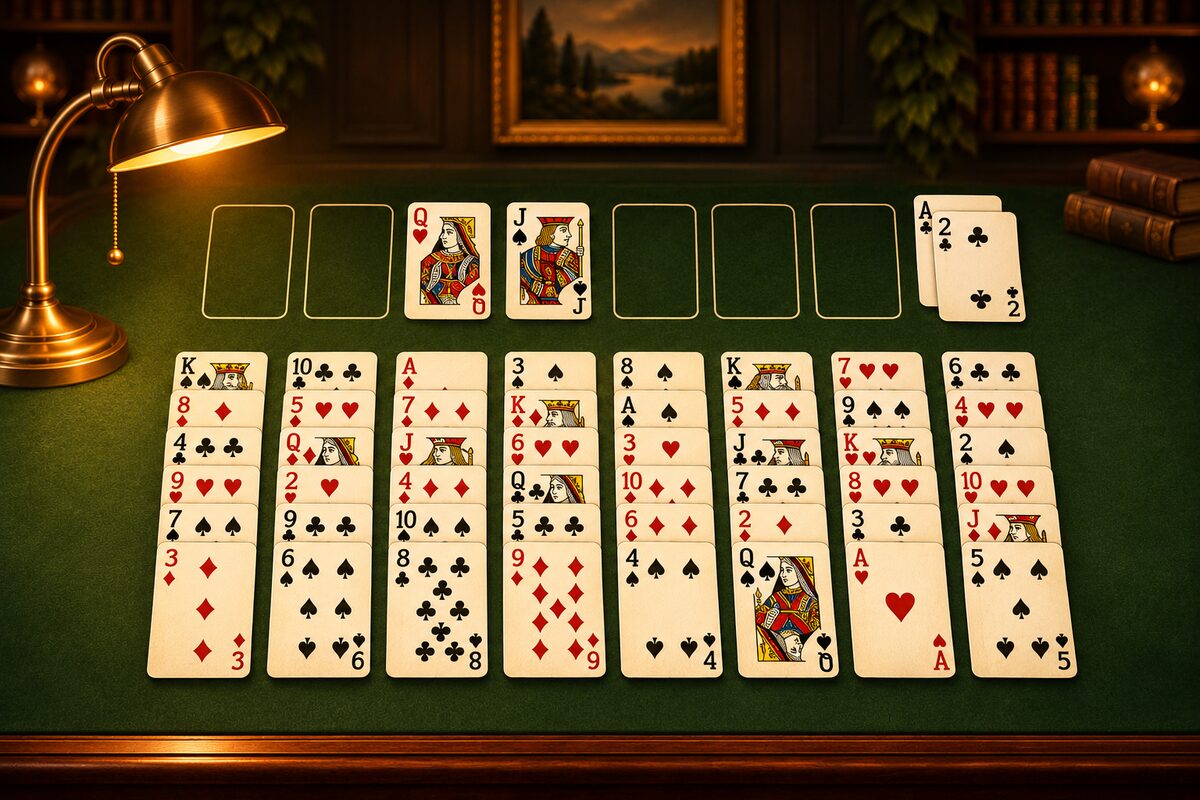
You start FreeCell by laying out all 52 cards face up. There is no stock pile. The app deals in an instant, but if you know how the cards are laid out, it’s easier to think about which column to clear first.
1. Deal One at a Time into 8 Columns, Starting from the Left
Deal the well-shuffled 52 cards face up, one at a time from the left column to the right. After the eighth column, go back to the first. The diagram below shows the board after 16 cards.
2. Done When All 52 Are Dealt
Keep going until all 52 are dealt. 52 doesn’t divide evenly into 8 columns, so the four left columns get 7 cards and the four right columns get 6.
| Columns | Cards |
|---|---|
| Columns 1 to 4 | 7 |
| Columns 5 to 8 | 6 |
| Total | 52 |
The Eight Spaces in the Top Row
Eight spaces line up above the tableau.
- The four on the left: The free cells. Each can hold any one card.
- The four on the right: The home cells. Each builds one suit from A to K. In the FreeCell app, an empty home cell has a faint “A” drawn on it, so you can tell it from a free cell.
How the App Lays Out the Cards
The FreeCell app deals in this same order. When you press “New game,” the 52 cards are well shuffled and dealt in order starting from the left column. When you press “Restart,” it deals the same layout again from the beginning.
What the Layout Tells You
- The four right columns have one fewer card: The four right columns, with fewer cards, can be emptied slightly sooner. An empty column is a big place where any card can go (How to Use an Empty Column).
- The deeper in a column, the harder to dig out: On average, about 2.8 cards sit on top of any one card. How to dig out the Aces and 2s buried deep is the first thing to think about (Why Get Aces and Twos Out Early).
Tips for laying out real cards are collected in How to Play FreeCell with Real Cards.